
/*DataFlex Reports*/
DataFlex Reports provides all the tools to create pixel-perfect reports, from lists and labels to charts.
For quick insights, use built-in wizards and experts to generate ad-hoc reports. Need more flexibility? The VB-like formula language offers a fully programmable environment, making it easy to use for both beginners and experienced developers.
DataFlex Reports for you
Reporting is all about data, design, and precision. DataFlex Reports gives you everything you need - collection, filtering, formulas, and more - ready to use for both end-users and developers
DataFlex Reports offers a powerful visual layout designer. Developers can handle data collection and filtering in their code, then let DataFlex Reports create the pixel-perfect layout
DataFlex Reports is built for developers who want full control over their reports. The Developer Edition includes a robust library for easy integration in Windows, web, and mobile apps.
Be fully in control
To create advanced reports, it is important to have full control over the layout and behaviour of the report. DataFlex Reports provides an extensive visual designer and a vast library for software developers, to integrate reports in Windows, web and mobile applications.
Powerful wizards for creating new reports
Creating new reports is fully guided by means of a wizard. Simply go through all steps to get a first version of your report. It includes collecting data, visually creating or checking relationships between tables, selecting fields to show, sub-totals, sorting, filtering etc. etc.
Export options
Reports don’t necessarily need to be printed on paper. On the contrary, today’s business demands need to cover digital methods of sharing reports, and data. Therefore export options allow the user to produce PDF, HTML, Word, Excel, CSV and pictures as output.
What's New in DataFlex Reports
Fresh release, powerful updates! Discover the latest improvements in DataFlex Reports.
Go to What's New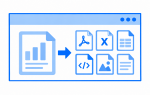
DataFlex Reports 2026 changes how export settings are exposed through the OCX. Instead of passing groups of settings through the previous export-option properties, developers can now work with individual properties for CSV, HTML, image, PDF, RTF and XLS exports.
This provides more granular control when configuring report exports programmatically. Options include page selection, PDF settings, CSV delimiters, image export settings and Excel behavior, making it easier to configure the exact output an application requires.
The change also means developers upgrading existing integrations should review code that uses the previous export-option properties.
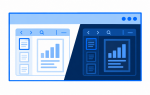
The web previewer receives several improvements in DataFlex Reports 2026. Dark theme support has been added to previewercommon.css, allowing the previewer to better match DataFlex web applications that use a dark interface.
The previewer implementation has also been updated as part of this release, replacing its previous iFrame-based approach.
Together, these changes provide a stronger foundation for integrating report previews into modern DataFlex WebApps.
Editions
DataFlex Reports is available as Developer and Standard Edition.
Targeted at developers, the Developer Edition offers advanced reporting tools for creating custom reports in Windows and web applications. It also supports royalty-free distribution of reports, making it perfect for integrating reports into software projects.
Designed for end-users, the Standard Edition allows for easy creation and execution of basic reports from SQL or DataFlex databases. It’s ideal for individuals or small businesses needing simple reporting solutions.
Purchase
DataFlex Reports can be purchased by contacting us.